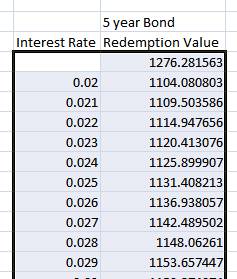
Using the Data Table tool in
Microsoft Excel
Data Table is a very handy tool when you want to see the answers generated by your MS Excel spreadsheet for a variety of different inputs. We’ll work through a simple example with interest rates here.
First, let’s build a spreadsheet which will calculate the redemption value of a $1000 five year savings bond. We will assume that interest is compounded once per year.
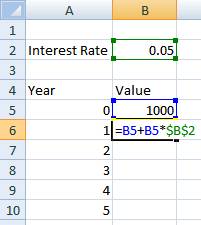
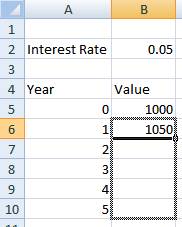
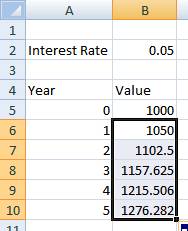
This spreadsheet shows us that when the interest rate is 0.05 (5%), the value after five years is $1276.28.
Now, suppose we wanted to know the redemption value for interest rates other than 5%. Many other interest rate, for example every rate from 2% to 8% in increments of 0.1%. We could type each of those into the Interest Rate cell (B2), but this would be time consuming. Let’s have Excel do it instead.
First set up a table which will hold the results. The left column should hold other the inputs you want to check (for us, the various interest rates). You will also need to leave one empty row in the table between your headings and the first input.
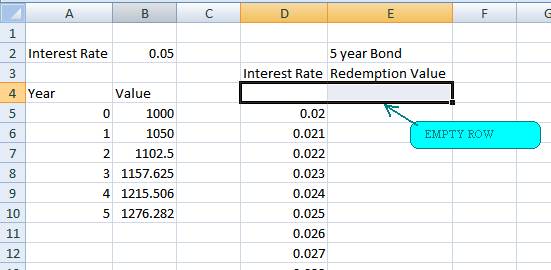
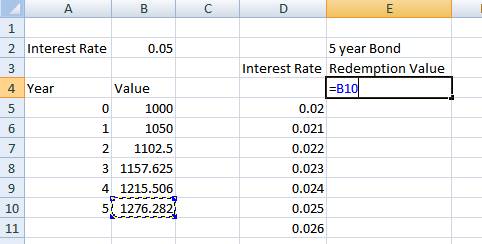
Now, we need to tell Excel where to find the answers for the second column. This goes in the row we left empty, in the second column in the cell between the heading and where the data will go. Connect that cell to the output (for this example, the value at 5 years).
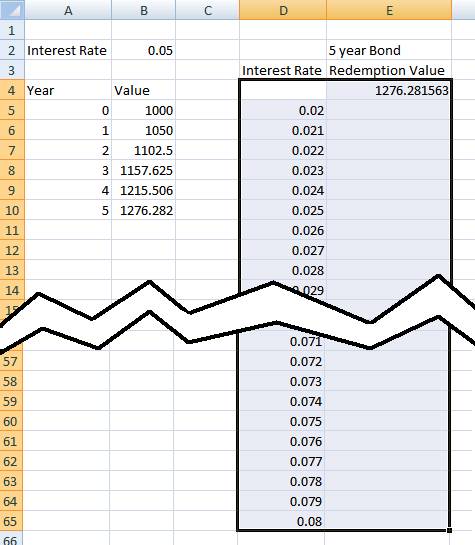
Now select the two columns of the table, including the row with the cell we just connected to 5 year value (but not including the headings).
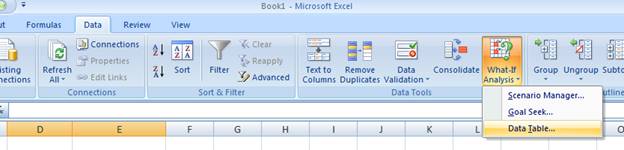
With that selected, go to the Data tab. Under What-If Analysis, choose Data Table.
The following box appears.
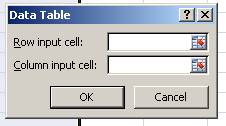
Our Data Table is arranged in columns, so we will be using the Column input cell. The Row input cell is left empty.
We have already told Excel where to find its results for the second column by connecting the top-right cell of the table. Now we need to tell Excel where to plug in the values in the first column. Thus for Column input cell we select the cell holding the Interest Rate.
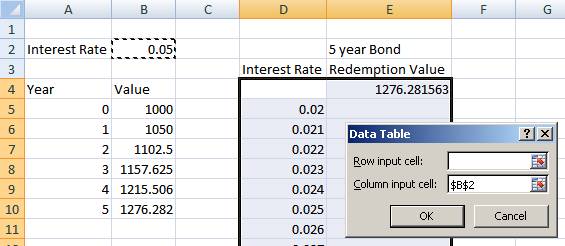
Now hit OK. Excel fills in all the various Redemption Values!